Free Flight Control Panel for space activities
-
Greetings Evolve Spacers:
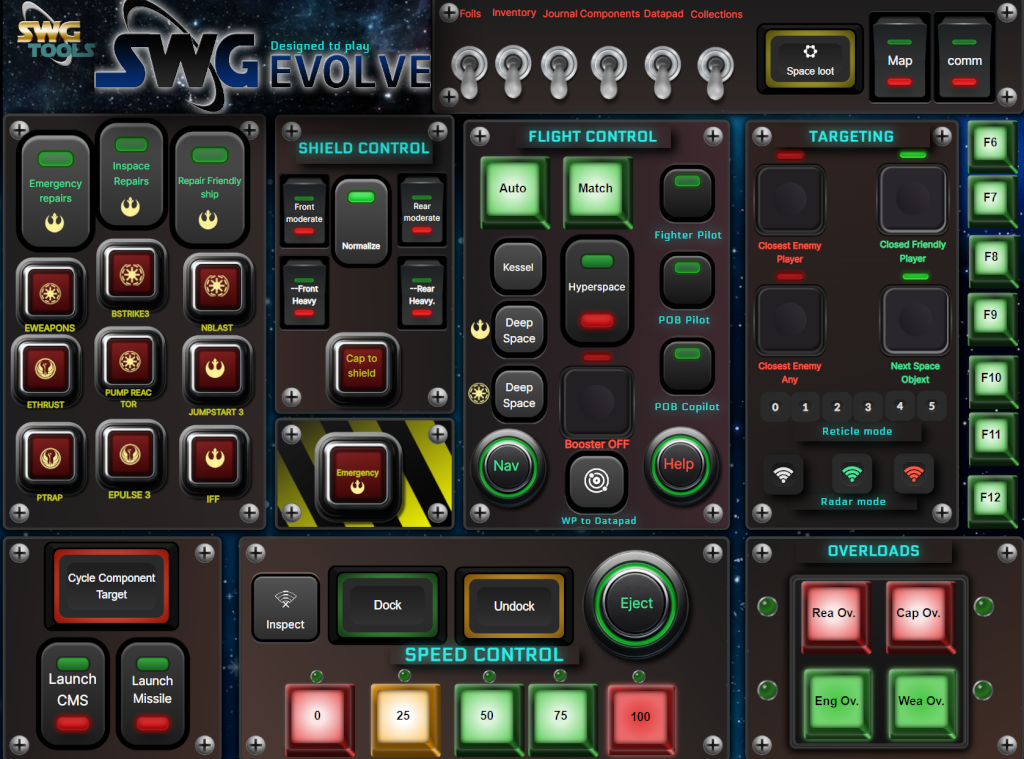
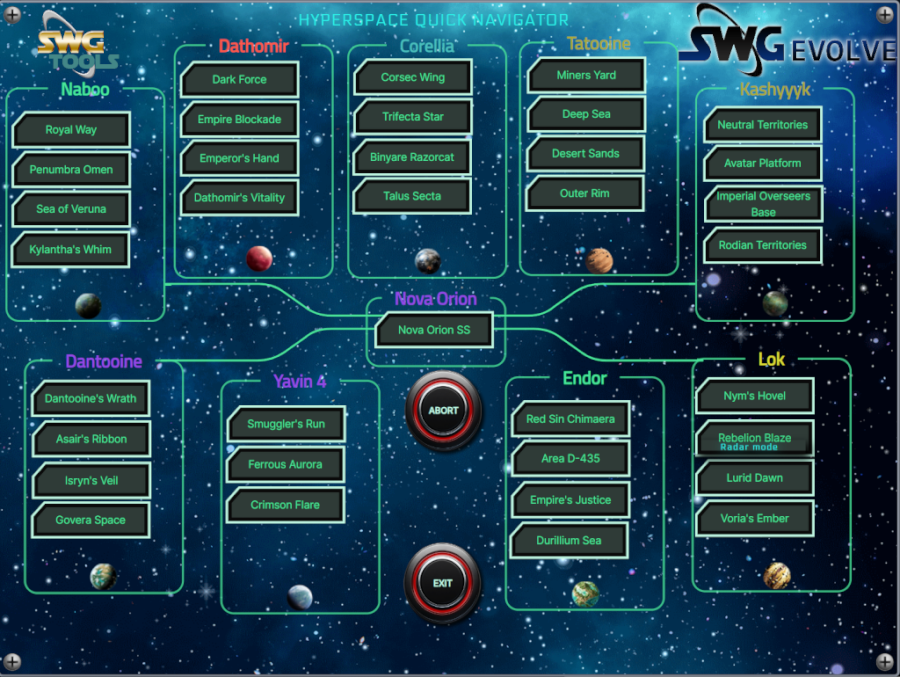
We, a group of Evolve and space lovers have created a new Flight Control Panel based on gameglass.gg technology.
This Panels are based on our own piloting experience but are open to any suggestion from the Community.
We are working on them but we are so excited on sharing with the community our progress...... and we will be more than welcome with your suggestions, all of them.All you need is a Tablet and join and install the gameglass.gg app in your desktop and in your tablet. You will find complete getting started instructions HERE
Once you are logged in gameglass, you will find SWGEvolve panels by exploring the available community shards under STAR WARS, AN EMPIRE DIVIDED game.
We hope u enjoy it while flying.
In the near future, we are going to add many specific and unique features and buttons related to the incoming evolve QOL additions.
Enjoy it, and please contact me or any of my fellows in evolve discord or in our own at Concord Dawn
Historical reactions: Like × 3
-
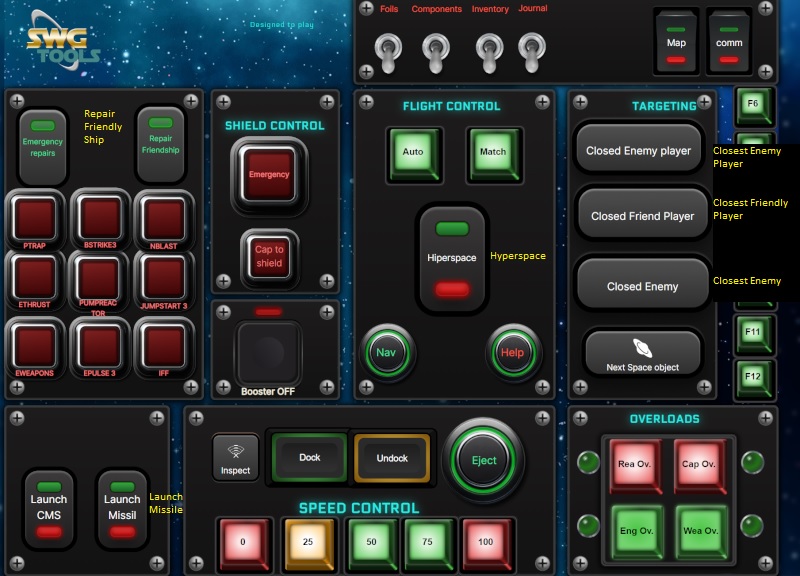
Very nice! A few misspellings, but still... Outstanding!
-
please, point me to misspellings... i will modify them inmediatly
Historical reactions: Like × 1
-
loganskenove, post: 1167, member: 617 wrote:
please, point me to misspellings... i will modify them inmediatly
Looks like english might not be your first language. Here you go -
-
The only thing I spotted wrong with the Hyperspace Nav page was the spelling of "Hyperspace" at the top.
And now that I think about it, it looks like some of these buttons might have been too small for the text...I've never used Game Glass... I prefer TouchPortal myself since I use it extensively with DCS World... Gonna have to give this a try. Thanks for all the work you put into it
 You did a very good job of cramming a ton of functions into a very small space.
 -
Thank you my friend. I will review the text fonts, of course. Right Templating is so important than featuring....
Historical reactions: Like × 1
-
UPDATE:
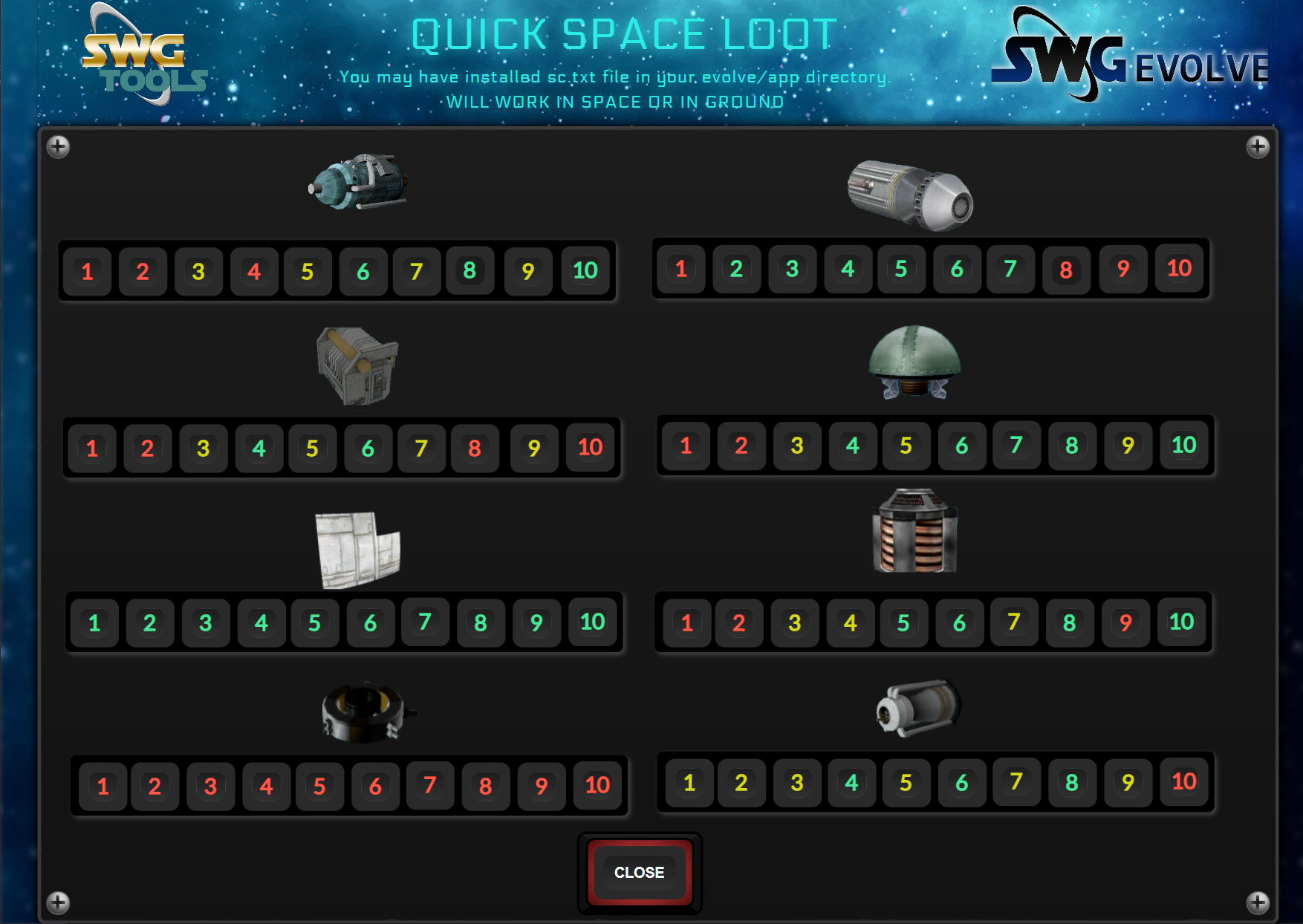
- Added a new Panel for QUICK SPACE LOOT CHECK.
This panel uses the sc.txt file previously installed in your evolve/app directory.
Be ready to check the loot stats with just on finger push.....
Enjoy it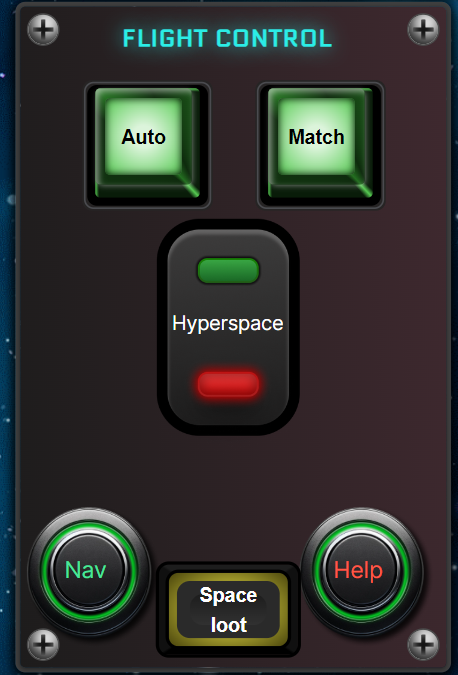
Historical reactions: Like × 1
-
loganskenove, post: 1211, member: 617 wrote:
UPDATE:
- Added a new Panel for QUICK SPACE LOOT CHECK.
This panel uses the sc.txt file previously installed in your evolve/app directory.
Be ready to check the loot stats with just on finger push.....
Enjoy it[Unavailable historical attachment #376][Unavailable historical attachment #377]
I do believe we have a candidate for space lord. Great idea's.. and work.. Cant wait for it to be in game.. All of it..
Historical reactions: Like × 1
-
loganskenove, post: 1211, member: 617 wrote:
UPDATE:
- Added a new Panel for QUICK SPACE LOOT CHECK.
This panel uses the sc.txt file previously installed in your evolve/app directory.
Be ready to check the loot stats with just on finger push.....
Enjoy it[Unavailable historical attachment #376][Unavailable historical attachment #377]
I think I'm happy in the pants...
FANTASTIC work, Sir.
-
Oh no.. took me a couple of years to just get a hand sample macro to work.. lol Im a very basic PC user .which is a crazy thing for 30 plus years of use
-
ADDITIONAL UPDATE:
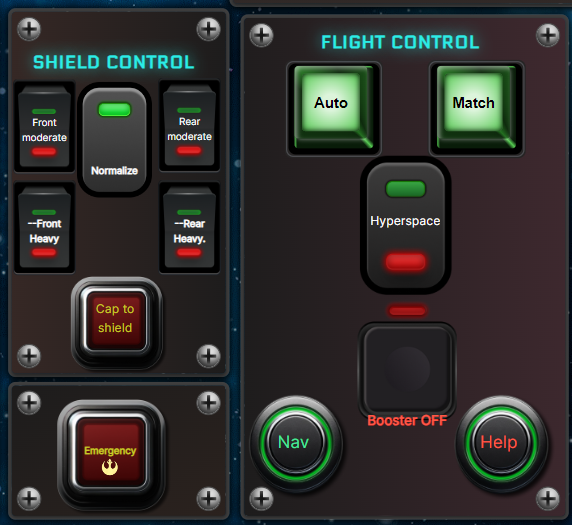
I had completely forgotten some pilots like to use the Shields configurations and shield normalization.
Because of that:- I have added the most used shields control and shields nomalize and redistribute some buttons to allow such inclusion.
Hope you Enjoy the changes
Historical reactions: Like × 1
- I have added the most used shields control and shields nomalize and redistribute some buttons to allow such inclusion.
-
loganskenove, post: 1218, member: 617 wrote:
ADDITIONAL UPDATE:
I had completely forgotten some pilots like to use the Shields configurations and shield normalization.
Because of that:- I have added the most used shields control and shields nomalize and redistribute some buttons to allow such inclusion.
Hope you Enjoy the changes
[Unavailable historical attachment #378]
When is the in-game statue of you going to be installed?
- I have added the most used shields control and shields nomalize and redistribute some buttons to allow such inclusion.
-
your words value is higher than any statue... Thanks so much my friend
Historical reactions: Like × 1
-
UPDATE:
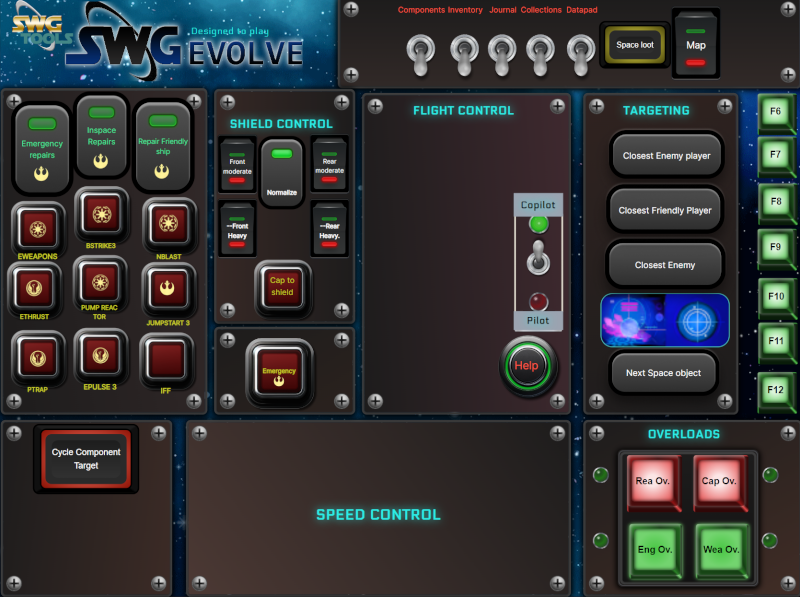
- Added Copilot role: By selecting the COPILOT/PILOT button, pilot buttons will be hidden/shown. This allow POB copilots to have available only the buttons/features they can use as copilots.
Enjoy.
- Added Copilot role: By selecting the COPILOT/PILOT button, pilot buttons will be hidden/shown. This allow POB copilots to have available only the buttons/features they can use as copilots.
-
loganskenove, post: 1222, member: 617 wrote:
UPDATE:
- Added Copilot role: By selecting the COPILOT/PILOT button, pilot buttons will be hidden/shown. This allow POB copilots to have available only the buttons/features they can use as copilots.
Enjoy.
[Unavailable historical attachment #380]
Something that just occurred to me looking at the overloads section...
Back in my days on Beyond, I wrote an all-overloads macro so that no matter what level a particular pilot was, it would cycle through all of the overloads so you didn't have to bother with keeping the individual buttons on the toolbar... You just run the one macro after launch/when you repaired and overloads were dumped. Core text of the macro at the end of this message.
What mechanism are you using to run the overloads in your panel? Would it be feasible for you to integrate them into a single button? That would save a small but significant amount of space in your panel configuration.
Here's the macro text - and also for anyone else that wants it:
/droid droidcommand_reactoroverloadfour;
/pause 2;
/droid droidcommand_reactoroverloadthree;
/pause 2;
/droid droidcommand_reactoroverloadtwo;
/pause 2;
/droid droidcommand_reactoroverloadone;
/pause 2;
/droid droidcommand_engineoverloadfour;
/pause 2;
/droid droidcommand_engineoverloadthree;
/pause 2;
/droid droidcommand_engineoverloadtwo;
/pause 2;
/droid droidcommand_engineoverloadone;
/pause 2;
/droid droidcommand_weaponoverloadfour;
/pause 2;
/droid droidcommand_weaponoverloadthree;
/pause 2;
/droid droidcommand_weaponoverloadtwo;
/pause 2;
/droid droidcommand_weaponoverloadone;
/pause 2;
/droid droidcommand_weapcappowerupfour;
/pause 2;
/droid droidcommand_weapcappowerupthree;
/pause 2;
/droid droidcommand_weapcappoweruptwo;
/pause 2;
/droid droidcommand_weapcappowerupone;
/pause 2;Historical reactions: Like × 1
- Added Copilot role: By selecting the COPILOT/PILOT button, pilot buttons will be hidden/shown. This allow POB copilots to have available only the buttons/features they can use as copilots.
-
SpaceGhost, post: 1217, member: 946 wrote:
Oh no.. took me a couple of years to just get a hand sample macro to work.. lol Im a very basic PC user .which is a crazy thing for 30 plus years of use
lol no worries. If you get the itch and want some help getting things set up just shout. You'll be able to get some more real time assistance on Discord with most of us

-
windshadow0177, post: 1224, member: 1090 wrote:
Something that just occurred to me looking at the overloads section...
Back in my days on Beyond, I wrote an all-overloads macro so that no matter what level a particular pilot was, it would cycle through all of the overloads so you didn't have to bother with keeping the individual buttons on the toolbar... You just run the one macro after launch/when you repaired and overloads were dumped. Core text of the macro at the end of this message.
What mechanism are you using to run the overloads in your panel? Would it be feasible for you to integrate them into a single button? That would save a small but significant amount of space in your panel configuration.
Here's the macro text - and also for anyone else that wants it:
/droid droidcommand_reactoroverloadfour;
/pause 2;
/droid droidcommand_reactoroverloadthree;
/pause 2;
/droid droidcommand_reactoroverloadtwo;
/pause 2;
/droid droidcommand_reactoroverloadone;
/pause 2;
/droid droidcommand_engineoverloadfour;
/pause 2;
/droid droidcommand_engineoverloadthree;
/pause 2;
/droid droidcommand_engineoverloadtwo;
/pause 2;
/droid droidcommand_engineoverloadone;
/pause 2;
/droid droidcommand_weaponoverloadfour;
/pause 2;
/droid droidcommand_weaponoverloadthree;
/pause 2;
/droid droidcommand_weaponoverloadtwo;
/pause 2;
/droid droidcommand_weaponoverloadone;
/pause 2;
/droid droidcommand_weapcappowerupfour;
/pause 2;
/droid droidcommand_weapcappowerupthree;
/pause 2;
/droid droidcommand_weapcappoweruptwo;
/pause 2;
/droid droidcommand_weapcappowerupone;
/pause 2;Cool... Will try this macro on the panel



Hello! It looks like you're interested in this conversation, but you don't have an account yet.
Getting fed up of having to scroll through the same posts each visit? When you register for an account, you'll always come back to exactly where you were before, and choose to be notified of new replies (either via email, or push notification). You'll also be able to save bookmarks and upvote posts to show your appreciation to other community members.
With your input, this post could be even better 💗
Register Login