Free Flight Control Panel for space activities
-
loganskenove, post: 1211, member: 617 wrote:
UPDATE:
- Added a new Panel for QUICK SPACE LOOT CHECK.
This panel uses the sc.txt file previously installed in your evolve/app directory.
Be ready to check the loot stats with just on finger push.....
Enjoy it[Unavailable historical attachment #376][Unavailable historical attachment #377]
I do believe we have a candidate for space lord. Great idea's.. and work.. Cant wait for it to be in game.. All of it..
Historical reactions: Like × 1
-
loganskenove, post: 1211, member: 617 wrote:
UPDATE:
- Added a new Panel for QUICK SPACE LOOT CHECK.
This panel uses the sc.txt file previously installed in your evolve/app directory.
Be ready to check the loot stats with just on finger push.....
Enjoy it[Unavailable historical attachment #376][Unavailable historical attachment #377]
I think I'm happy in the pants...
FANTASTIC work, Sir.
-
Oh no.. took me a couple of years to just get a hand sample macro to work.. lol Im a very basic PC user .which is a crazy thing for 30 plus years of use
-
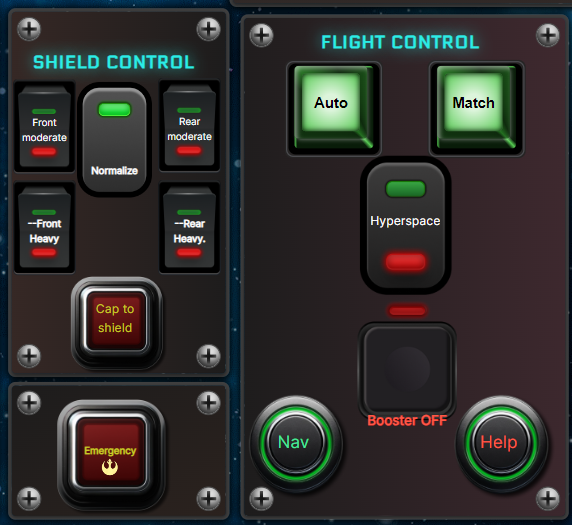
ADDITIONAL UPDATE:
I had completely forgotten some pilots like to use the Shields configurations and shield normalization.
Because of that:- I have added the most used shields control and shields nomalize and redistribute some buttons to allow such inclusion.
Hope you Enjoy the changes
Historical reactions: Like × 1
- I have added the most used shields control and shields nomalize and redistribute some buttons to allow such inclusion.
-
loganskenove, post: 1218, member: 617 wrote:
ADDITIONAL UPDATE:
I had completely forgotten some pilots like to use the Shields configurations and shield normalization.
Because of that:- I have added the most used shields control and shields nomalize and redistribute some buttons to allow such inclusion.
Hope you Enjoy the changes
[Unavailable historical attachment #378]
When is the in-game statue of you going to be installed?

- I have added the most used shields control and shields nomalize and redistribute some buttons to allow such inclusion.
-
your words value is higher than any statue... Thanks so much my friend
Historical reactions: Like × 1
-
UPDATE:
- Added Copilot role: By selecting the COPILOT/PILOT button, pilot buttons will be hidden/shown. This allow POB copilots to have available only the buttons/features they can use as copilots.
Enjoy.
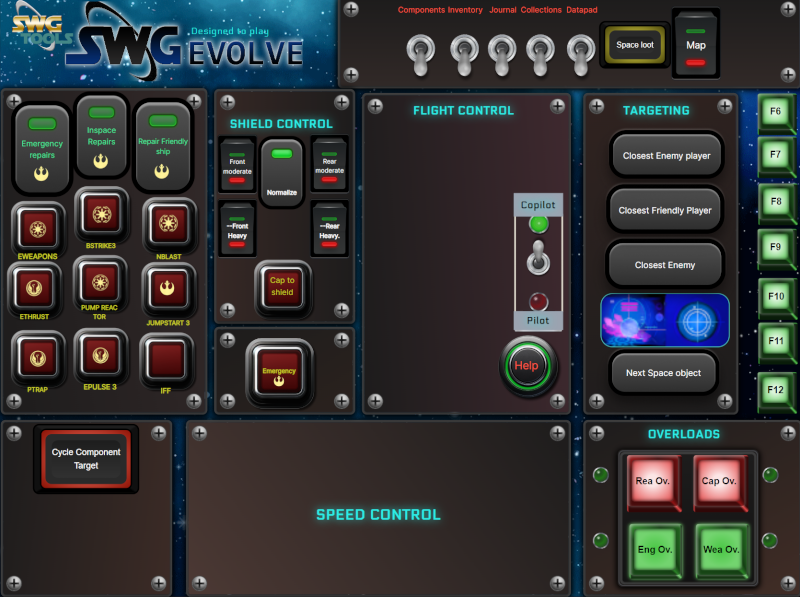
- Added Copilot role: By selecting the COPILOT/PILOT button, pilot buttons will be hidden/shown. This allow POB copilots to have available only the buttons/features they can use as copilots.
-
loganskenove, post: 1222, member: 617 wrote:
UPDATE:
- Added Copilot role: By selecting the COPILOT/PILOT button, pilot buttons will be hidden/shown. This allow POB copilots to have available only the buttons/features they can use as copilots.
Enjoy.
[Unavailable historical attachment #380]
Something that just occurred to me looking at the overloads section...
Back in my days on Beyond, I wrote an all-overloads macro so that no matter what level a particular pilot was, it would cycle through all of the overloads so you didn't have to bother with keeping the individual buttons on the toolbar... You just run the one macro after launch/when you repaired and overloads were dumped. Core text of the macro at the end of this message.
What mechanism are you using to run the overloads in your panel? Would it be feasible for you to integrate them into a single button? That would save a small but significant amount of space in your panel configuration.
Here's the macro text - and also for anyone else that wants it:
/droid droidcommand_reactoroverloadfour;
/pause 2;
/droid droidcommand_reactoroverloadthree;
/pause 2;
/droid droidcommand_reactoroverloadtwo;
/pause 2;
/droid droidcommand_reactoroverloadone;
/pause 2;
/droid droidcommand_engineoverloadfour;
/pause 2;
/droid droidcommand_engineoverloadthree;
/pause 2;
/droid droidcommand_engineoverloadtwo;
/pause 2;
/droid droidcommand_engineoverloadone;
/pause 2;
/droid droidcommand_weaponoverloadfour;
/pause 2;
/droid droidcommand_weaponoverloadthree;
/pause 2;
/droid droidcommand_weaponoverloadtwo;
/pause 2;
/droid droidcommand_weaponoverloadone;
/pause 2;
/droid droidcommand_weapcappowerupfour;
/pause 2;
/droid droidcommand_weapcappowerupthree;
/pause 2;
/droid droidcommand_weapcappoweruptwo;
/pause 2;
/droid droidcommand_weapcappowerupone;
/pause 2;Historical reactions: Like × 1
- Added Copilot role: By selecting the COPILOT/PILOT button, pilot buttons will be hidden/shown. This allow POB copilots to have available only the buttons/features they can use as copilots.
-
SpaceGhost, post: 1217, member: 946 wrote:
Oh no.. took me a couple of years to just get a hand sample macro to work.. lol Im a very basic PC user .which is a crazy thing for 30 plus years of use
lol no worries. If you get the itch and want some help getting things set up just shout. You'll be able to get some more real time assistance on Discord with most of us

-
windshadow0177, post: 1224, member: 1090 wrote:
Something that just occurred to me looking at the overloads section...
Back in my days on Beyond, I wrote an all-overloads macro so that no matter what level a particular pilot was, it would cycle through all of the overloads so you didn't have to bother with keeping the individual buttons on the toolbar... You just run the one macro after launch/when you repaired and overloads were dumped. Core text of the macro at the end of this message.
What mechanism are you using to run the overloads in your panel? Would it be feasible for you to integrate them into a single button? That would save a small but significant amount of space in your panel configuration.
Here's the macro text - and also for anyone else that wants it:
/droid droidcommand_reactoroverloadfour;
/pause 2;
/droid droidcommand_reactoroverloadthree;
/pause 2;
/droid droidcommand_reactoroverloadtwo;
/pause 2;
/droid droidcommand_reactoroverloadone;
/pause 2;
/droid droidcommand_engineoverloadfour;
/pause 2;
/droid droidcommand_engineoverloadthree;
/pause 2;
/droid droidcommand_engineoverloadtwo;
/pause 2;
/droid droidcommand_engineoverloadone;
/pause 2;
/droid droidcommand_weaponoverloadfour;
/pause 2;
/droid droidcommand_weaponoverloadthree;
/pause 2;
/droid droidcommand_weaponoverloadtwo;
/pause 2;
/droid droidcommand_weaponoverloadone;
/pause 2;
/droid droidcommand_weapcappowerupfour;
/pause 2;
/droid droidcommand_weapcappowerupthree;
/pause 2;
/droid droidcommand_weapcappoweruptwo;
/pause 2;
/droid droidcommand_weapcappowerupone;
/pause 2;Cool... Will try this macro on the panel
-
windshadow0177, post: 1224, member: 1090 wrote:
Something that just occurred to me looking at the overloads section...
Back in my days on Beyond, I wrote an all-overloads macro so that no matter what level a particular pilot was, it would cycle through all of the overloads so you didn't have to bother with keeping the individual buttons on the toolbar... You just run the one macro after launch/when you repaired and overloads were dumped. Core text of the macro at the end of this message.
What mechanism are you using to run the overloads in your panel? Would it be feasible for you to integrate them into a sin
/pause 2;
/droid droidcommand_reactoroverloadtwo;
/pause 2;
/droid droidcommand_reactoroverloadone;
/pause 2;
/droid droidcommand_engineoverloadfour;
/pause 2;
/droid droidcommand_engineoverloadthree;
/pause 2;
/droid droidcommand_engineoverloadtwo;
/pause 2;
/droid droidcommand_engineoverloadone;
/pause 2;
/droid droidcommand_weaponoverloadfour;
/pause 2;
/droid droidcommand_weaponoverloadthree;
/pause 2;
/droid droidcommand_weaponoverloadtwo;
/pause 2;
/droid droidcommand_weaponoverloadone;
/pause 2;
/droid droidcommand_weapcappowerupfour;
/pause 2;
/droid droidcommand_weapcappowerupthree;
/pause 2;
/droid droidcommand_weapcappoweruptwo;
/pause 2;
/droid droidcommand_weapcappowerupone;
/pause 2;This is an excellent idea.
I have test it and works. Some improvements:
In stead of creating an unique button, I will maintain one button for each overload type. Each button will cycle over its own overload type till found the loaded one into the droid. I think this is a better way because wating for the execution of 16 commands takes too long. In the other hand, the pilot feel more control over the ship panel.An additional advantage is, we will be able to use toolbar F1 to F5 for other functions than overloads.
And more: Once the whole panel do not use the toolbar, pilots would be only worried on having the droid chips loaded. No more worries about toolbar configuration in Space....
I am modifying the panel right now.... will release the new one in a few
Very good and usefull idea my friend.
Historical reactions: Like × 1
-
I am gonna tell you more windshadow0177.
Your addition opened my mind.
Being this panel a "non factional" panel , must be universal, but the factional buttons can be used as droid commands or as ability depending on your faction.Because of this....
I am adding a cycle search for all factional abilities. So , for example, if you are imperial, you can not execute IFF by your self, so u need a chip loaded. The IFF button will search in you abilities first, and if do not find it then will try an iff droid command.
By this way we definitely solve the commads/droid chips and will be much more easy to configure your ship, i think.This is the Theory. Now i am testing if will work or not in all cases....
Historical reactions: Like × 1
-
Unfourtunally i have not found a command in the commands available list to make, for example, iff on a droid command... If i am not wrong, there is no way to do that thing unless, devs allow it under certain circumstances (being Ace of Ace, for example) as i have read in the suggestions channels an discussions.
If someday happens, I would add those commands/droid to the panels.Anyway, I will add whatever is possible right now, to the panel
Historical reactions: Like × 1
-
loganskenove, post: 1235, member: 617 wrote:
Unfourtunally i have not found a command in the commands available list to make, for example, iff on a droid command... If i am not wrong, there is no way to do that thing unless, devs allow it under certain circumstances (being Ace of Ace, for example) as i have read in the suggestions channels an discussions.
If someday happens, I would add those commands/droid to the panels.Anyway, I will add whatever is possible right now, to the panel
Correct, IFF is not a droid command, it's a pilot skill that Neutrals and Rebels can use.
None of the pilot abilities can be assigned to droid command chips. The only "emergency" droid command is emergency shields, but that behaves differently to the pilot ability of a very similar name.
Currently programmable droid commands are:
- Component Normalize - Resets overloads or tuning back to defaults.
- Component Tuning - Decreases the statistics of the specified component to make it drain the reactor/capacitor less, while also being less effective.
- Component Overloads - Increases stats at the cost of higher reactor/capacitor drain.
- Shield Reinforce Front/Rear - Moves a portion of shield energy toward the front or rear.
- Capacitor to Shield Shunt - Takes a portion of your capacitor energy and pushes it into your shields.
- Shield Adjust Front/Rear - Changes the ratio of Front/Rear shield capacity. Adjusting to the front increases the maximum shield strength of the front while decreasing the rear, for example.
- Emergency Shields Front/Rear - A combination command of Shield Reinforce and Capacitor to Shield Shunt.
- Hyperspace chip for Deep Space (Rebel/Imperial faction locked)
- Hyperspace chip for Kessel system.
- Mute the droid/flight computer - Need I say mo-
Emergency power to shields takes power from every other component, typically disabling everything except the engines and increases the shield recharge rate... tremendously.
Historical reactions: Like × 2
-
Draskon, post: 1236, member: 808 wrote:
Correct, IFF is not a droid command, it's a pilot skill that Neutrals and Rebels can use.
None of the pilot abilities can be assigned to droid command chips. The only "emergency" droid command is emergency shields, but that behaves differently to the pilot ability of a very similar name.
Currently programmable droid commands are:
- Component Normalize - Resets overloads or tuning back to defaults.
- Component Tuning - Decreases the statistics of the specified component to make it drain the reactor/capacitor less, while also being less effective.
- Component Overloads - Increases stats at the cost of higher reactor/capacitor drain.
- Shield Reinforce Front/Rear - Moves a portion of shield energy toward the front or rear.
- Capacitor to Shield Shunt - Takes a portion of your capacitor energy and pushes it into your shields.
- Shield Adjust Front/Rear - Changes the ratio of Front/Rear shield capacity. Adjusting to the front increases the maximum shield strength of the front while decreasing the rear, for example.
- Emergency Shields Front/Rear - A combination command of Shield Reinforce and Capacitor to Shield Shunt.
- Hyperspace chip for Deep Space (Rebel/Imperial faction locked)
- Hyperspace chip for Kessel system.
- Mute the droid/flight computer - Need I say mo-
Emergency power to shields takes power from every other component, typically disabling everything except the engines and increases the shield recharge rate... tremendously.
Thx my friend. We will stay tunned to any QOL future update/improvement in order to add it to the Flight Panel
-
UPDATE:
- Thx to windshadow0177 : added cycle secuence to RO, CO , EO and WO. Overloads command search on the droid for existing programs to execute the available one. By this we will not need to have the overload icons assigned into the toolbarslot00. F1 to F4. CTSS is still on toolbar00 F5
- Added Radar & reticle buttons selection
- Some other buttons redesign and positioning in the panel
Enjoy and thx for the help and advises
Historical reactions: Like × 1
-
Pilot commands MIGHT still have a / command available. remember a lot of the JTL stuff runs off of pre-cu keybinds and commands still.
you could try /commands such as /iff or /emergencyshields stuff like that. For a full list of commands. You can also do a // in chat it will display all known commands in your chat window.
beware though doing a // is a very long list.
Historical reactions: Like × 1





Hello! It looks like you're interested in this conversation, but you don't have an account yet.
Getting fed up of having to scroll through the same posts each visit? When you register for an account, you'll always come back to exactly where you were before, and choose to be notified of new replies (either via email, or push notification). You'll also be able to save bookmarks and upvote posts to show your appreciation to other community members.
With your input, this post could be even better 💗
Register Login