SWG Evolve on Bazzite
-
With how bad Microsoft has been for the past couple of weeks, I figured I would give Bazzite another go. I was able to get the launcher to run, and it loaded the game. So I'm linking a Bazzite install guide, and then adding the steps I did to get the game working. I do recommend using the Fedoraa Media Writer to make the install drive, as it allows you to restore the USB drive after you finish with it. These steps should work with other Linux Distros as well, but you might have to do a bit more work to get Faugus Launcher in other distros.
Official Bazzite Install Guide
[URL unfurl="true"]https://docs.bazzite.gg/General/Installation_Guide/[/URL]
Video Guide
<LC3ByQYz5Jw>After installation
-
Open Bazaar - App store, logo looks like a farmer's market stand.
-

-
Download Faugus Launcher.
-

-
Download the SWG Evolve Launcher zip from the website.
-
Extract the SWG Evolve Launcher, and place the extracted folder where you want it.
-
Right click on the SWG Evolve Launcher.exe file and select "Open with Faugus Create Shortcut."
-
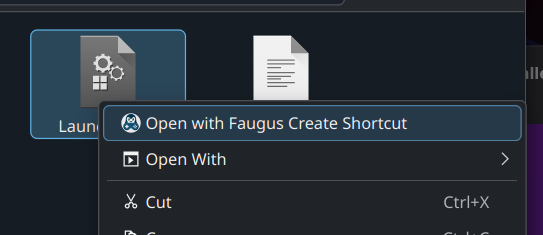
-
Run the launcher from the new icon created on your desktop and install the game, should work as usual from there.
-
-
I ran into the same issues with windows you did and also switched to bazzite. I did it a little differently though. Here's what I did:
- Download the SWG Evolve Launcher zip from the website
- Extract the folder where you want it.
- Open Steam
- Add non steam game under the games menu and follow the prompts
- In your library right click on Launcher.exe and select properties
- Under comparability check the box for Force the use of a specific Steam Play compatibility tool. It didn't work for me when I left it unchecked
- Select an option from the dropdown menu. On this step you may need to try a few different ones until you find one that works. As of this writing Proton Hotfix has been working for me but it does change sometimes after updates.
When I was on windows the game would crash several times a day and have issues when multiboxing. Since I've switched to Bazzite, I haven't had hardly any issues. Of course mileage will vary I am sure. These instructions will also work on a Steam Deck too. In theory it should work for other distros as well, but I haven't played around with any others.
-
I been off the game for a year and am a returning player. I never had an issue with it working through Proton till now. When I log in it shows me my characters for a split second and then disconnects? Is this a proton issue or something with my account? I am at this point wondering, but don't want to bother them unless Someone else knows the answer as it could very well just be I need change to another proton. Thanks again
EDIT
Turned out it was a character race on one of my toons that was messing it up. All working on Linux Mint now.
Hello! It looks like you're interested in this conversation, but you don't have an account yet.
Getting fed up of having to scroll through the same posts each visit? When you register for an account, you'll always come back to exactly where you were before, and choose to be notified of new replies (either via email, or push notification). You'll also be able to save bookmarks and upvote posts to show your appreciation to other community members.
With your input, this post could be even better 💗
Register Login