How to Upvote Player Suggestions
-
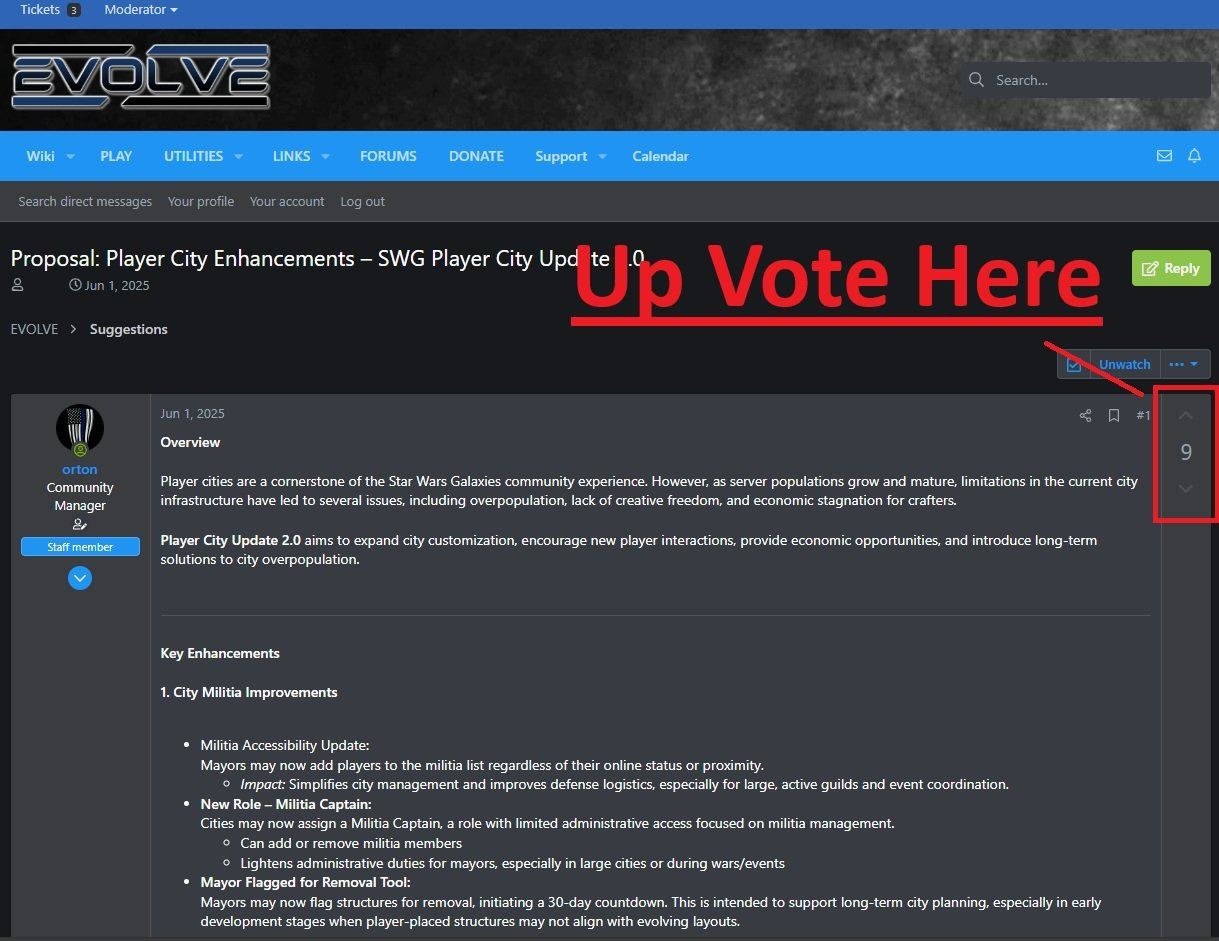
When browsing the Suggestions section of the forums, you’ll notice an up arrow on the right-hand side of each post (highlighted in red in the screenshot above). Clicking this arrow will upvote the suggestion.
Upvoting is one of the most important ways you can provide feedback. Development uses these upvotes to help gauge community interest and prioritize which ideas and features to work on next. The more upvotes a suggestion receives, the more visibility and weight it carries during planning and discussion.
If you see a suggestion you like, agree with, or want to see implemented in the future, please be sure to upvote it. Even if you don’t have anything additional to add in a reply, your upvote still matters and helps guide development focus.
Thanks for taking the time to support ideas you care about and helping shape the future of Evolve.
Orton
Evolve Community ManagerAttachments
Historical reactions: Like × 1
-
System pinned this topic

Hello! It looks like you're interested in this conversation, but you don't have an account yet.
Getting fed up of having to scroll through the same posts each visit? When you register for an account, you'll always come back to exactly where you were before, and choose to be notified of new replies (either via email, or push notification). You'll also be able to save bookmarks and upvote posts to show your appreciation to other community members.
With your input, this post could be even better 💗
Register Login